Vision
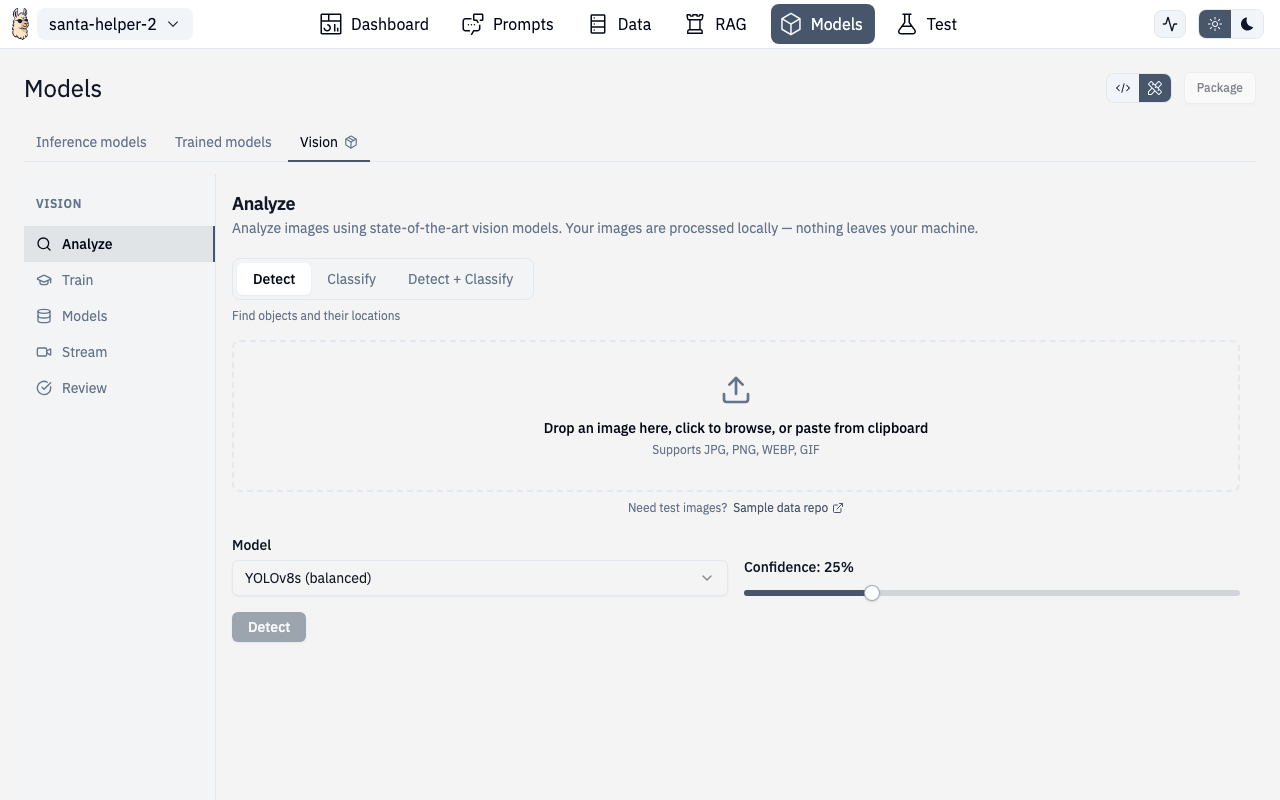
The Vision panel provides OCR, image analysis, object detection with bounding boxes, model training, and real-time streaming detection.
Tabs
The Vision panel has five sub-sections accessible via a left sidebar:
Analyze
Upload and analyze images:
- Drag-and-drop or click to upload images
- Run OCR to extract text from images
- Get image descriptions and analysis
- View results alongside the original image
Train
Train custom vision models:
- Upload training images with annotations
- Draw bounding boxes on images using the interactive canvas
- Define object classes
- Configure training parameters
- Monitor training progress
Models
Manage saved vision models:
- View all trained models
- Load a model for inference
- Delete models you no longer need
- Navigate to training to create new models
Stream
Real-time detection using a trained model:
- Connect to a video feed or webcam
- Run continuous object detection
- See bounding boxes overlaid in real-time
- Monitor detection confidence scores
Review
Review detection results:
- Browse past detection runs
- Verify accuracy of detections
- Filter by confidence threshold
- Export results
Bounding Box Canvas
The interactive canvas component supports:
- Drawing new bounding boxes by click-and-drag
- Resizing existing boxes
- Labeling boxes with class names
- Zooming and panning on large images
- Undo/redo
API Routes
| Action | Method | Route |
|---|---|---|
| Detect objects | POST | /v1/vision/detect |
| Classify image | POST | /v1/vision/classify |
| Detect + Classify | POST | /v1/vision/detect_classify |
| OCR | POST | /v1/vision/ocr |
| Train model | POST | /v1/vision/train |
| List models | GET | /v1/vision/models |
Route
Vision is accessed through the Test page in vision mode:
/chat/test (select Vision mode)