ML Training
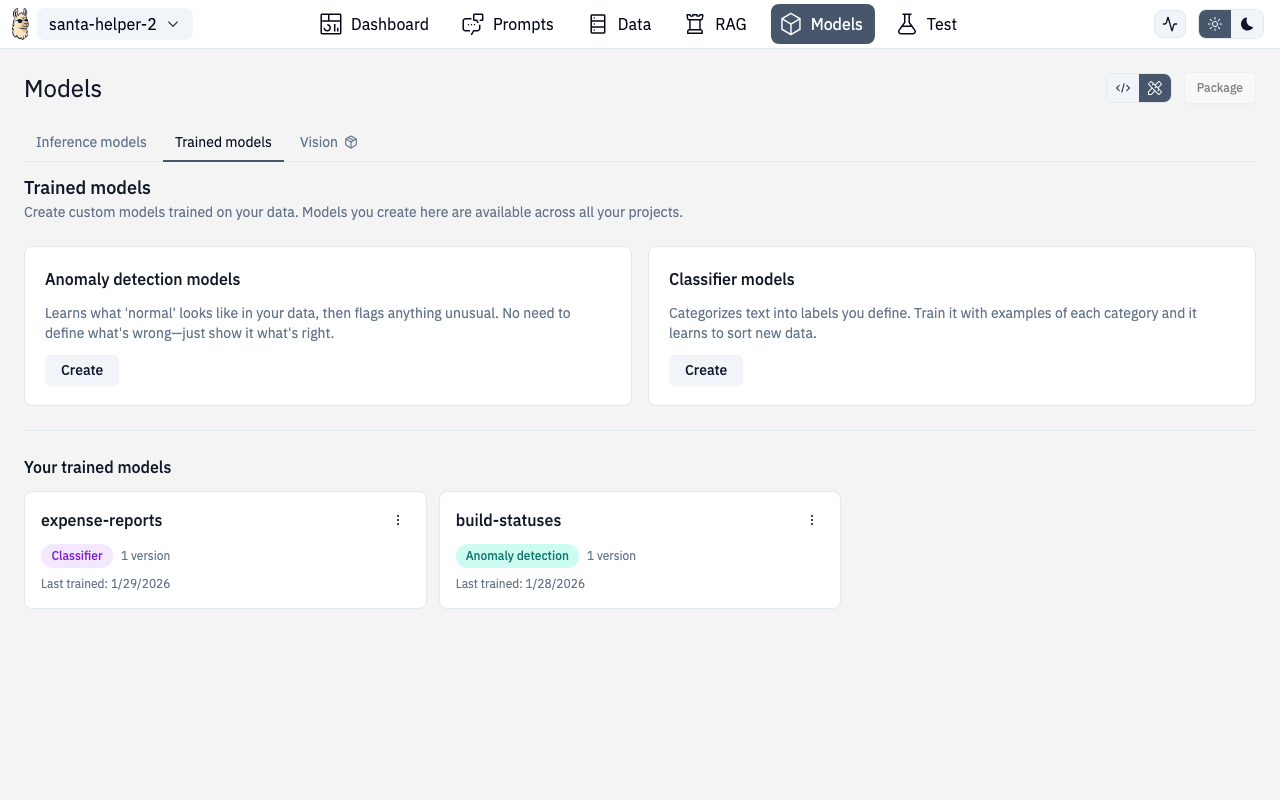
The Designer includes built-in tools for training classifiers and anomaly detection models — no ML expertise required. These run on the Universal Runtime.
Text Classifiers
Train a text classifier using SetFit (few-shot fine-tuning). Great for sentiment analysis, ticket routing, content categorization, and more.
How It Works
- Choose a base model — select an embedder model (default:
all-MiniLM-L6-v2) - Add training data — enter text/label pairs, or use a sample dataset
- Train — click Train and watch progress in real-time
- Test — enter text and see predictions with confidence scores
Available Base Models
| Model | Dimensions | Notes |
|---|---|---|
all-MiniLM-L6-v2 | 384 | Default, fast, good general purpose |
bge-small-en-v1.5 | 384 | Strong English performance |
bge-base-en-v1.5 | 768 | Larger, more accurate |
bge-large-en-v1.5 | 1024 | Best accuracy, slower |
bge-m3 | 1024 | Multilingual support |
e5-base-v2 | 768 | Good for retrieval tasks |
e5-large-v2 | 1024 | Larger variant |
Sample Datasets
Built-in sample datasets to get started quickly:
- Sentiment analysis — 3 classes, 200 examples (positive/negative/neutral)
- Additional domain-specific samples available
Managing Trained Models
The Trained Models view lists all your classifier models with:
- Model name and version
- Training timestamp
- Number of classes and examples
- Actions: load, test, delete
Anomaly Detection
Train anomaly detection models using PyOD backends. Useful for fraud detection, system monitoring, quality control, and any scenario where you need to identify outliers.
Backends
12 PyOD backends organized by category:
| Category | Backends | Best for |
|---|---|---|
| Fast (Recommended) | ECOD, HBOS, COPOD | General purpose, parameter-free |
| Legacy (Well-Tested) | Isolation Forest, LOF, KNN, OCSVM | Traditional ML approaches |
| Deep Learning | AutoEncoder, VAE | Complex patterns |
| Ensemble | SUOD, LSCP | Combining multiple detectors |
Training Flow
- Select a backend — ECOD recommended for most cases
- Configure features — define feature columns with encoding types and normalization
- Add training data — paste text/CSV or use table input mode
- Set threshold — contamination ratio (default varies by backend)
- Train — model trains and shows results
Feature Configuration
Each feature column supports:
- Encoding types — numeric, one-hot, label, ordinal, binary, frequency
- Normalization — standard, min-max, robust, none
Streaming Anomaly Detection
For real-time monitoring, the streaming mode provides:
- Mode toggle — switch between batch and streaming detection
- Status panel — connection status, events processed, anomalies detected
- Results chart — live visualization of anomaly scores over time
- Mode panel — configure streaming parameters
API Routes
| Action | Method | Route |
|---|---|---|
| Train classifier | POST | /v1/ml/classifier/fit |
| Predict (classifier) | POST | /v1/ml/classifier/predict |
| List classifier models | GET | /v1/ml/classifier/models |
| Train anomaly model | POST | /v1/ml/anomaly/fit |
| Score anomaly | POST | /v1/ml/anomaly/score |
| List anomaly models | GET | /v1/ml/anomaly/models |
Route
/chat/models/train/classifier/new
/chat/models/train/classifier/:id
/chat/models/train/anomaly/new
/chat/models/train/anomaly/:id