Speech
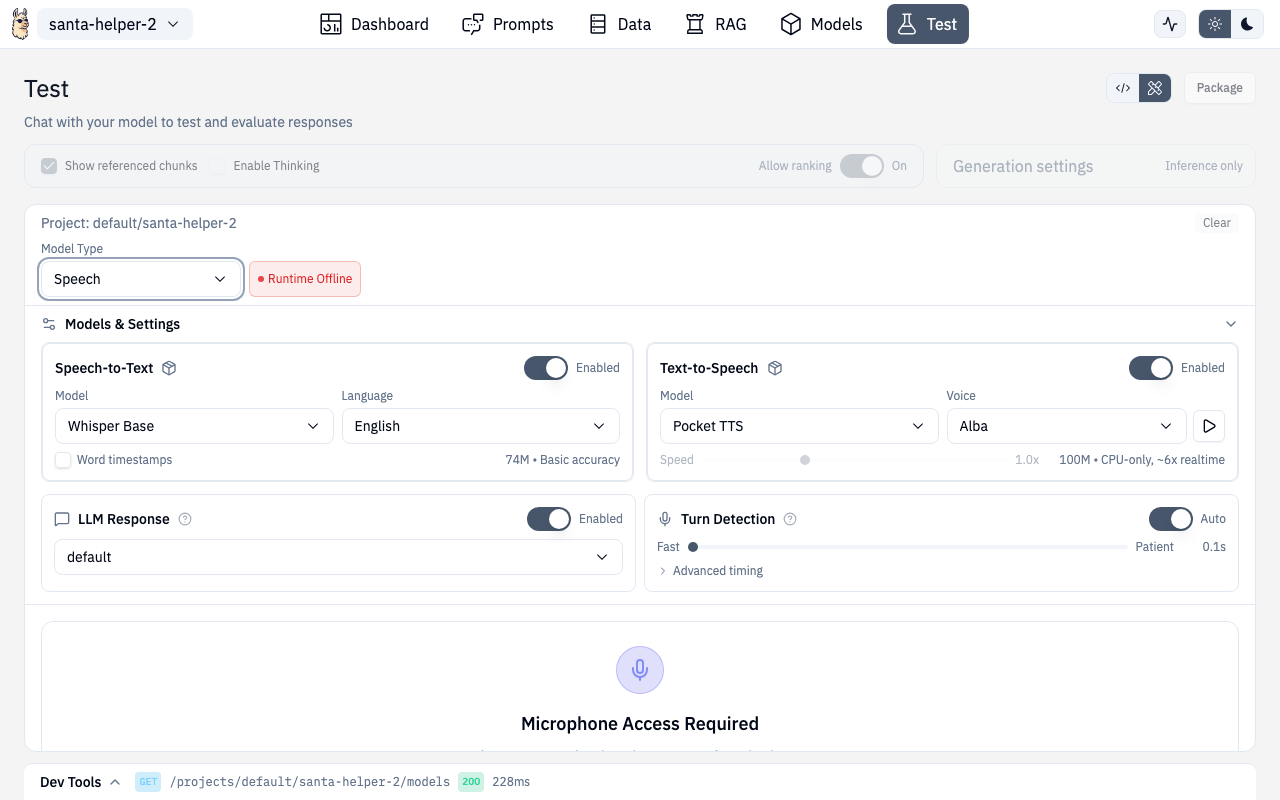
The Speech panel provides speech-to-text (STT), text-to-speech (TTS), voice cloning, and full voice conversation capabilities. These features require the speech addons to be installed (see Addons).
Speech-to-Text (STT)
Record audio and get transcriptions:
- Model selection — choose from available Whisper models (base, small, medium, large)
- Language — set the source language for better accuracy
- Word timestamps — optionally get per-word timing data
- Live waveform — visualize audio input in real-time
Recording
Click the microphone button to start recording. The waveform visualization shows audio levels in real-time. Click stop when done, and the transcription appears below.
If microphone access hasn't been granted, a permission prompt guides you through enabling it.
Text-to-Speech (TTS)
Convert text to spoken audio:
- Model selection — choose from available TTS models (e.g.,
pocket-tts) - Voice selection — pick from available voices for the selected model
- Audio playback — listen to generated audio with built-in player
- History — previous TTS generations are kept for reference
Voice Cloning
Create custom voices from audio samples:
- Record or upload a voice sample
- Clone the voice for use with TTS
- Use cloned voices in conversation mode
Conversation Mode
Full voice-to-voice conversation with your AI:
- Turn detection — configurable settings for when the AI should start responding
- Continuous conversation — alternating speech turns with the AI
- Conversation view — see the full transcript with speaker labels
- Model integration — uses your project's configured inference model for responses
Turn Detection Settings
Configure how the system detects when you've stopped talking:
- Silence threshold
- Minimum speech duration
- Response delay
Requirements
Speech features require the Universal Runtime (port 11540) to be running. The panel checks runtime health automatically and shows status badges for STT/TTS availability.
If addons aren't installed, an inline prompt lets you install them directly or navigate to the Addons page.
API Routes
| Action | Method | Route |
|---|---|---|
| Transcribe audio | POST | /v1/audio/transcriptions (Universal Runtime) |
| Synthesize speech | POST | /v1/{ns}/{project}/audio/speech |
| List voices | GET | /v1/{ns}/{project}/audio/voices |
| Stream transcription | WebSocket | /v1/audio/transcriptions/stream (Universal Runtime) |
Route
Speech is accessed through the Test page in speech mode:
/chat/test (select Speech mode)