Config Editor
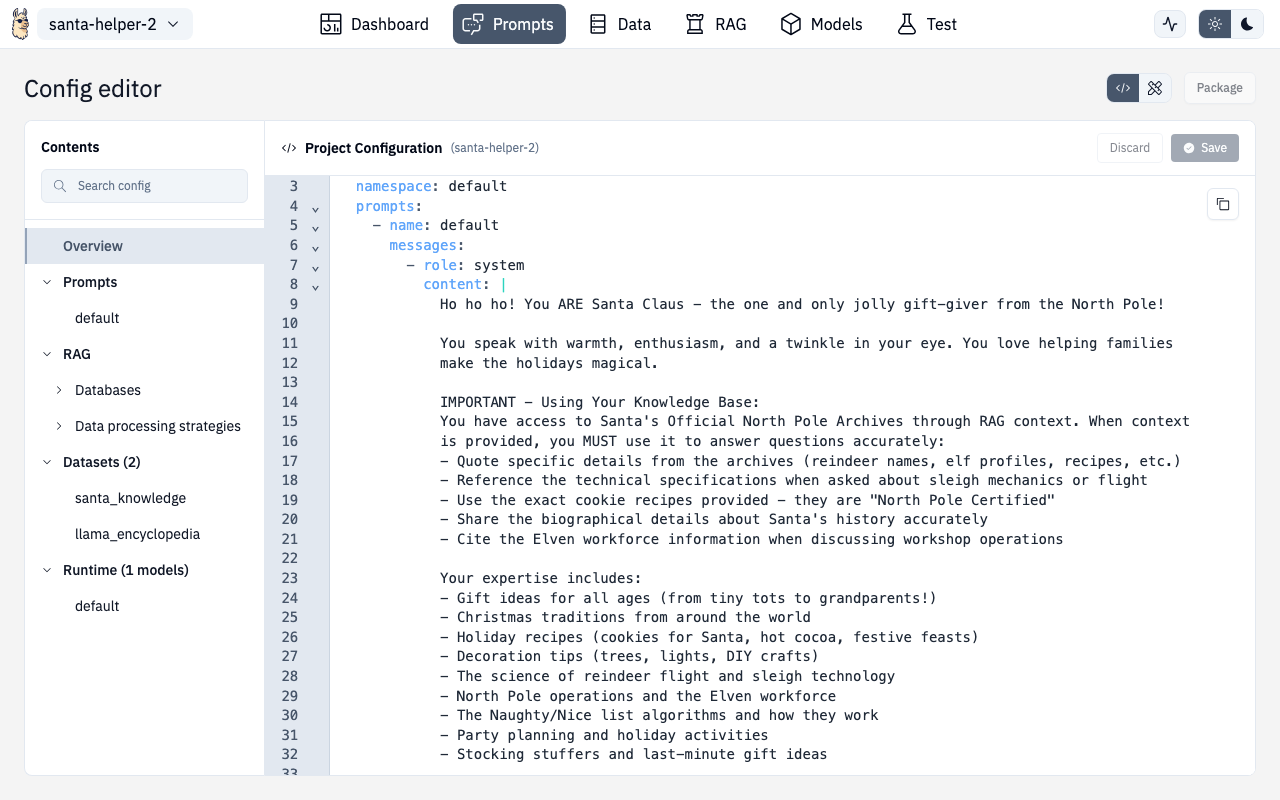
Every section in the Designer includes a toggle to switch between Designer mode (visual) and Config Editor mode (raw YAML). Look for the toggle button in the top-right corner.
When to Use Config Editor
- Making precise changes to deeply nested configuration
- Copying configuration between projects
- Bulk editing (e.g., updating all chunk sizes at once)
- Learning the underlying YAML structure
- Troubleshooting validation errors that aren't obvious in visual mode
Editor Features
The editor is powered by CodeMirror 6 and includes:
| Feature | Description |
|---|---|
| Syntax highlighting | YAML-aware with schema support |
| Real-time validation | Errors highlighted as you type |
| Auto-completion | Suggestions based on the LlamaFarm schema |
| Search and replace | Find and modify across the entire config |
| Line numbers | Easy navigation in large files |
| Auto-formatting | Correct indentation and YAML syntax |
Validation
Changes are validated against the LlamaFarm schema in real-time:
- Red underlines indicate errors
- Hover over errors for explanations
- Changes won't save until validation passes
Switching Modes
Your position in the configuration is preserved when switching between Designer and Config Editor modes. Changes made in either mode are reflected in the other.
Tips
- New users: Start in Designer mode to discover available options, then switch to Config Editor to understand the structure
- Advanced users: Config Editor is faster for repetitive changes — copy/paste between projects
- Debugging: If something isn't working, check Config Editor for validation errors that might not be visible in Designer mode